MocastaApp
A downloadable tool
Check below to learn how to use it!
https://note.com/polygros/n/n256a422feb53
Update:
[2026-04-04: v0.5]
>>New Features
Added support for importing external VMD and VRMA motion data. You can now import distributed VMD files into VRM and make them dance.
*Please ensure you comply with the copyright holder's usage rules when using VMD files.
>>New & Removed Features
The “Explosion” button has been removed, and a “Confetti” button has been added. Pressing it causes confetti to fall; pressing it again stops the confetti.
(Other) Starting with this version, the installer format has been discontinued. After extracting the ZIP file, an executable folder will be created; please run MocastaApp.exe from there.
[2025-12-17:v0.4b]
Changed the motion selection UI from a dropdown to a scrollable list. Also added support for keyword filtering and sorting.
*The sorting function changes the specifications of the dance motion data. Please be sure to re-download the assets from the Settings tab on the right side of the screen.
[2025-12-16:v0.4]
>>Feature Additions
Implemented a seek bar. You can drag it to freely change the playback position.
Completely revised the UI size.
Removed the smudged characters in the logo and reduced the display area.
Added display of the total animation time and playback position time.
Changed the default startup background to a green screen.
Reduced the phenomenon of background images being “cut off”.
>>Bugfix
When the REC button is pressed during playback, playback stops, but recording can now continue from that position.
Fixed an issue where recording would fail with an error if the Windows username was in Japanese.
Translated with DeepL.com (free version)
[2025-09-13: v0.3] Fixed an issue where the app would hang if the file path for saving videos contained Japanese characters. Changed behavior so only the file is saved in the save folder instead of creating a folder with the same name as the file. Set the default lip sync microphone input to zero.
[2025-08-22] Added dance motions (No app version update required. Can be used as is).
[2025-07-26: v0.2] Added FPS limit setting. Fixed an issue where some VRMs couldn't be loaded.
[2025-07-23: v0.1] Initial release.
What is the Mocasta App?
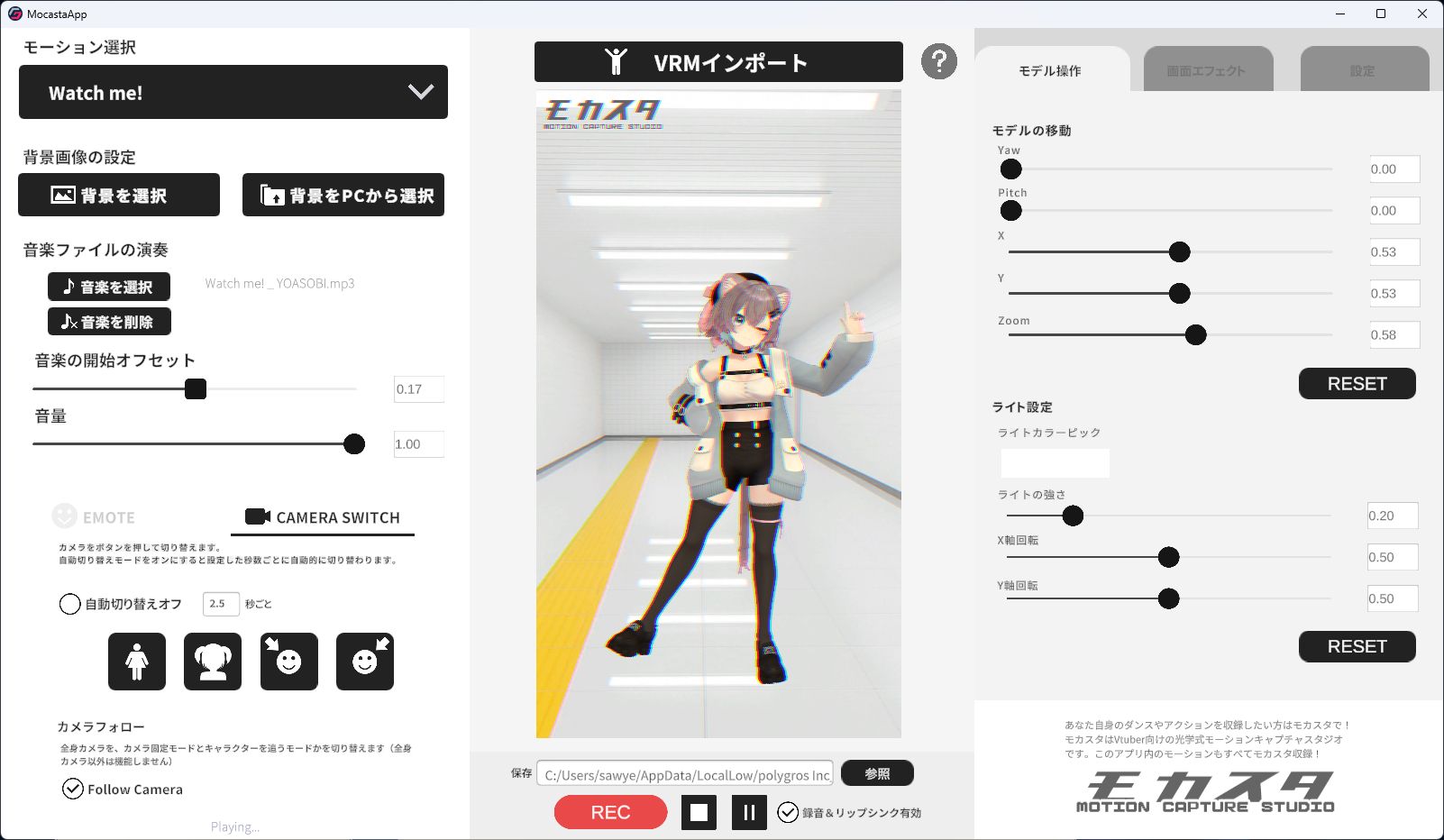
Mocasta App is a free and easy-to-use Windows application that lets anyone create short dance videos using their own VRM virtual characters.
It comes preloaded with a wide selection of viral short dance motions. Just load your VRM model, choose a dance motion, and instantly apply high-quality animations to your avatar.It also supports VMD and VRMA motion data, so you can import these files and have the character dance in VRM.
Thanks to the power of virtual technology, all you need to do is select a motion from the app—your character will perform it, and you can watch and export the result as a video with ease.
Key Features of Mocasta App
• VRM Import
Import your own VRM-format model and bring it to life with animated dances.
・VMD/VRMA Import Function
You can import external VMD/VRMA motion data to make VRM models dance.
• Dance Video Creation
Use pre-installed dance motions to animate your VRM model and save the result as an MP4 video.
All videos you create are yours to use freely, and new motion data is added regularly.
• BGM Sync
You can load your own music files and sync them with the video playback for custom soundtracks.
• Background Customization
Easily switch background images using built-in still images or import your own (PNG/JPG at 1920×1080 resolution).
• Model Transform Tools
Adjust your VRM model’s position, angle, and distance from the camera freely.
• Camera Switching
Choose from various camera angles—full body, close-up, side views, etc.
A random auto-switching camera mode is also included for dynamic shots.
• Facial Expression Control
Switch facial expressions with a single click, or use Auto Mode for natural variations like “Happy Mode” or “Serious Mode.”
• Voice Recording
Record your own voice with a microphone to create fully original short videos with custom voiceovers.
• Lip Sync
The app syncs your character’s mouth movement with your microphone input for realistic lip-sync animation.
• Visual Effects
Customize brightness, contrast, and saturation—or apply special effects like retro mosaics, scanlines, or comic-style dithering for added flair.
Sample Videos Created with Mocasta App
Download
Install instructions
Running the .exe file will launch the installer.
The End User License Agreement (EULA) will be shown during installation.
Leave a comment
Log in with itch.io to leave a comment.